
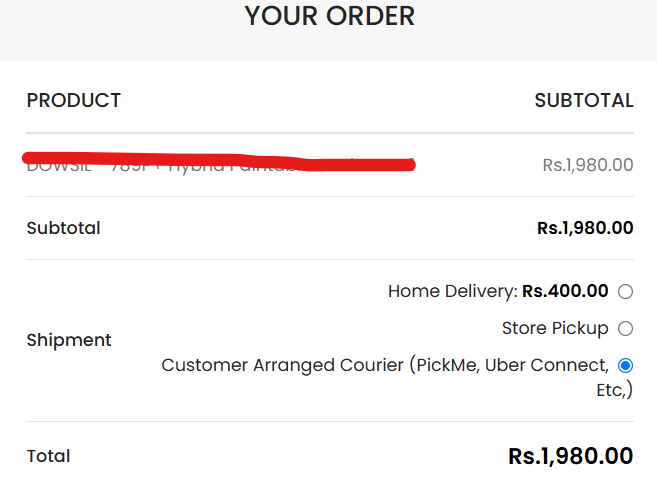
The WooCommerce checkout page is one of the most important parts of any online store. A clean, modern checkout experience builds customer confidence and can improve conversion rates. Unfortunately, the default WooCommerce shipping section looks outdated and doesn’t match many premium website designs.
In this tutorial, you’ll learn how to transform the standard WooCommerce shipping methods into elegant, responsive shipping cards using a single PHP snippet—without installing any additional plugins.
Why Customize WooCommerce Shipping Methods?
The default WooCommerce shipping layout has several limitations:
- Plain radio button layout
- Outdated appearance
- Poor visual hierarchy
- Limited mobile experience
- Doesn’t match premium store designs
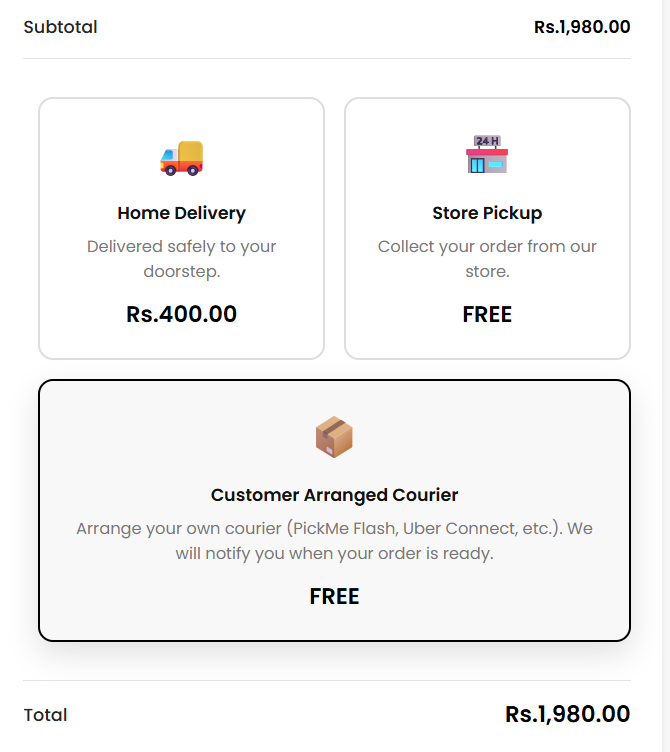
A modern card-based interface makes delivery options easier to understand and creates a more professional checkout experience.
Benefits
- Modern card design
- Responsive on desktop and mobile
- Cleaner checkout page
- Better customer experience
- No additional plugins required
- Lightweight and fast
- Automatically displays shipping prices
Default WooCommerce Layout
Improved Checkout Layout
Features Included
- Hide the default “Shipment” heading
- Modern card-style shipping methods
- Automatic shipping prices
- FREE label for zero-cost shipping
- Hover animations
- Premium black styling
- Responsive layout
- Easy customization
Perfect For
- WooCommerce Stores
- Fashion Stores
- Electronics Stores
- Furniture Stores
- Book Shops
- Local Delivery Businesses
- Sri Lankan eCommerce Websites
Customer Arranged Courier
More online stores now offer customers the option to arrange their own courier service. This is particularly useful for businesses that support:
- PickMe Flash
- Uber Connect
- Personal Courier Services
- Business Delivery Partners
This option provides customers with greater flexibility while reducing delivery management for store owners.
Performance Benefits
Unlike many checkout customization plugins, this solution is lightweight and optimized for performance.
- No external libraries
- No additional database tables
- No unnecessary scripts
- Fast loading
- Easy to maintain
Compatible With
- WooCommerce
- Flatsome Theme
- Astra
- GeneratePress
- OceanWP
- Storefront
- Most WooCommerce-compatible themes
Customization Ideas
- Estimated delivery dates
- Courier company logos
- Store pickup map
- Delivery instructions
- Shipping badges
- Same-day delivery labels
- Delivery insurance
- Express shipping indicators
Final Thoughts
Improving your WooCommerce checkout doesn’t always require expensive plugins. A simple UI enhancement like modern shipping cards can make the checkout process cleaner, easier to understand, and more visually appealing.
Better user experience often leads to higher customer satisfaction and improved conversion rates, making this one of the easiest checkout improvements you can implement.
Need Custom WooCommerce Development?
NanoGenz specializes in professional WordPress and WooCommerce development.
- Custom WooCommerce Development
- Plugin Development
- Checkout Customization
- Payment Gateway Integration
- Shipping & Courier Integration
- Performance Optimization
- UI/UX Improvements
- Custom Business Solutions
Whether you need a custom WooCommerce feature or a fully bespoke plugin, NanoGenz can help bring your ideas to life.